
Support me and read the full colour comic over on my Patreon NOW Eisner and Harvey NOMINATED!

0 73261
 

A4 Issue Four

If you prefer you can download the pdf here.

My unending gratitude to Matt and John Yuan (deputy publishers of 1First Comics) who volunteered way back on issue 1 to proofread (off the back of a plaintive twitter plea) and ending up both being great proofreaders and even better editors - constantly encouraging and giving little notes that never alter the fabric of the story but always help.

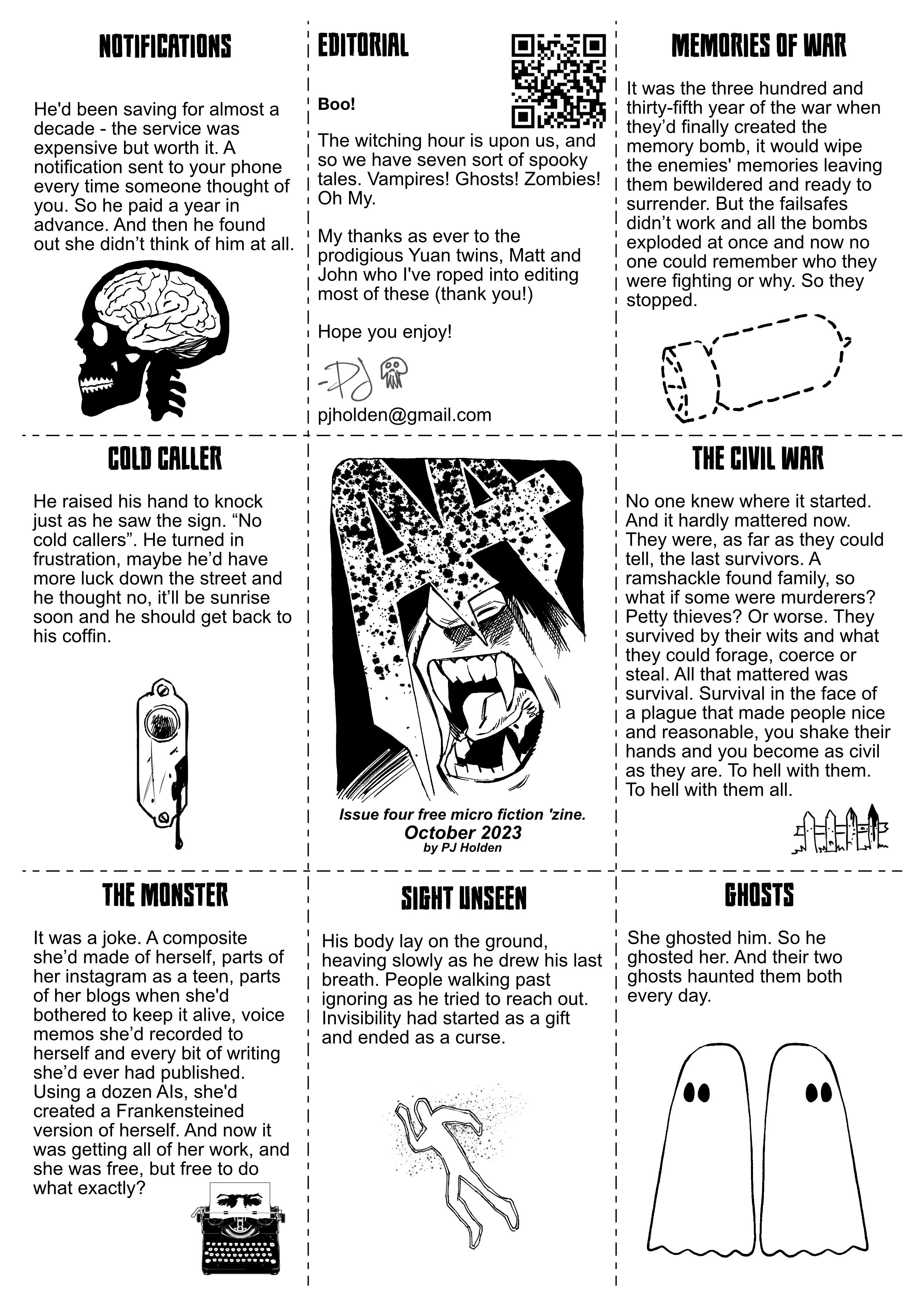
Stories this issue:

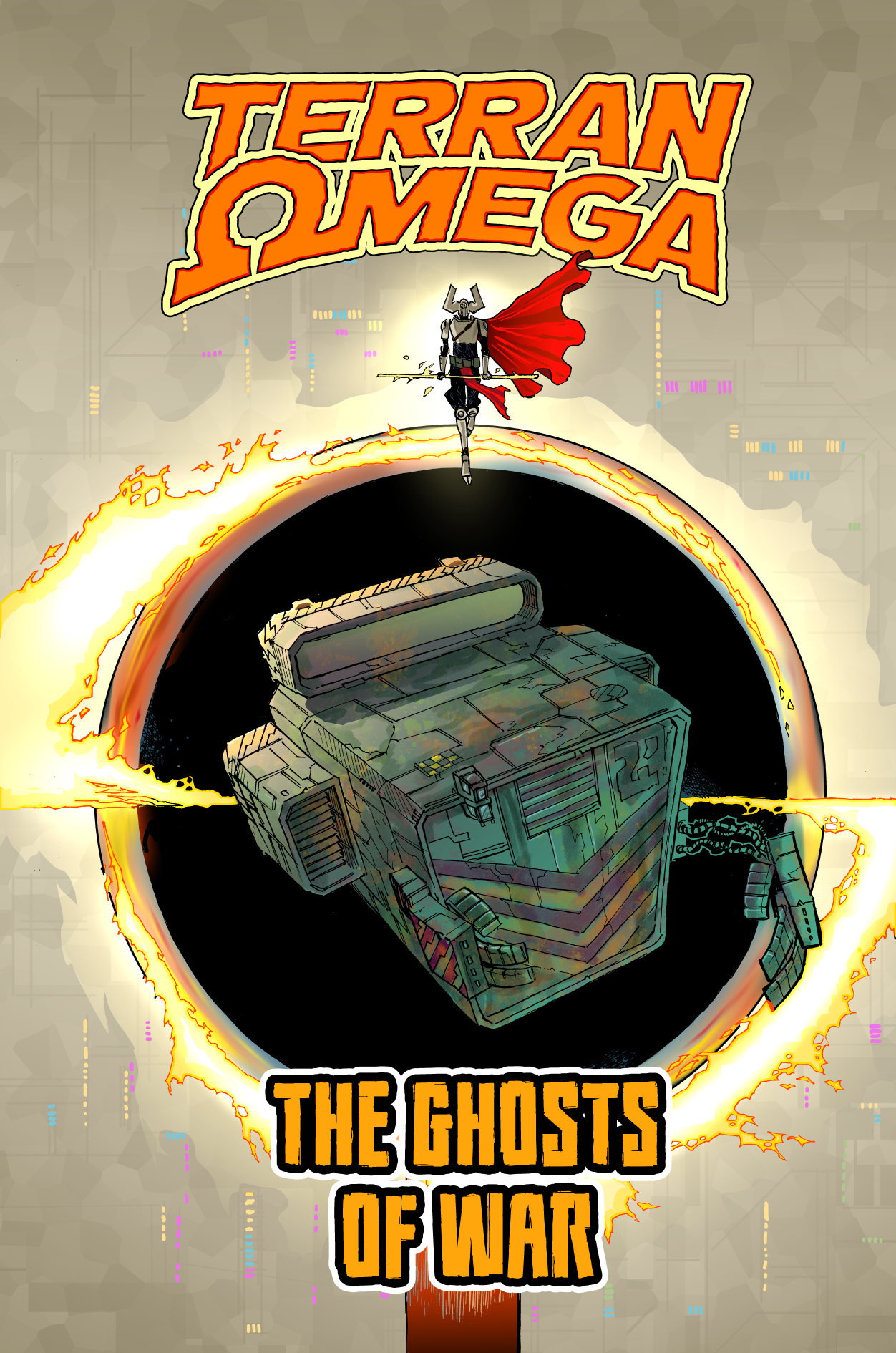
Notifications, Memories of War, Cold Caller, The Civil War, The Monster, Sign Unseen, Ghosts.

A4 Issue Four Notes!

Gah, two stories with War in the title. So annoying. Hadn't spotted it until now, but there it is. It will be my eternal shame.

There were two things drilled in to me from English lessons in secondary school (which I did rather enjoy, I loved writing, and was told to apply for O-Levels early, so I did, and then I didn't do any work because I was fundamentally lazy - so failed it) anyway, the two things: never use the word got/gotten (I think this was my teachers personal bugbear, with teenagers writing "I got given a book then got a clip round the there and got out of there, before he got me" even I'm uncomfortable seeing the word "got" in anything I write) and never repeat a word if you can help it (obvious "I", "and" and so on are all fine). So two wars. Not good. Am annoyed. (Should point out, this is entirely a quirk of my own making!)

From hereon in there will likely be spoilers!

I had planned on a halloween all horror special - or at least as best as I'm able, but of course, I couldn't quite come up with every single story as a horror, so let's start with the least horror like story:

Notifcations

I suppose this and Ghosts share a very common through line, rejection and knowing the person who rejected you never even thinks of you. For a full exploration of this idea, watch the amazing "The Eternal Sunshine of the Spotless Mind".

Memories of War

There's a lot going on in the world, and much of it can be traced back so far that you'll never find the beginning point (hello from Northern Ireland!) - and the question is, if everyone lost their memories would those wars still continue. (this story optimistically says we'd all stop, I have a horrible feeling we wouldn't)

Cold Caller

Phew! Lighter fair! Actually there's a different story that uses the same sort of idea (the no-hawkers caveat that many people have at their door) I've been sitting noodling as a short comic for a few years (how many? oh man, it's embarrassing to tell - but let's say I first thought of it pre-pandemic) it would be far too long to do as one of these stories, so this slightly different version of it popped in to my head.

I am pretty proud of that title though, it came late - after I'd written a bunch of the stories and I was thinking "gah, now i need a title" and ping! there it was!

I did want to do stuff that was just a smidge lighter than last issue, because I've been told some of this stuff is DARK. I think of it all in the abstract, words on paper rather than real monsters. But we're haunted by the real and the imaginary, I suppose.

The Civil War

I saw a writer (a good writer;   it'll be a good book) talking their new Zombie book and it got me thinking, that zombie stories tend to be the ultimate "yeah of course I was the assehole prepping for the end of the world, and look, I WAS RIGHT" and I thought "what if instead of it being zombies, it's that everyone was just really really nice to each other ... oh... those asseholes wouldn't change..."

The Monster

I'll be honest, andI bet readers can tell, I shoehorned frankenstien in too this (because I wanted monsters, dammit)

Here's my orginal story idea from the apple notes app:

He had fragmented himself, Pumping his entire written and audio corpus through AI Large Language Models, and created an army of bots, one for each of the balkanised social media platforms. And he was finally free. Free to get on with work.

Is it better? it might be.

Sight Unseen

This could be policitical satire, I suppose. In the hands of a better writer. Instead it's simply a piece of fiction.

Ghosts

Gotta be honest, I just loved the shape and sound of the story. I love that it works on a couple of levels.  It pretty much came out fully formed, and so short. Honestly this is the joy of these shorts, there's not an ounce of fat on the idea, there's no point trying to extend it, and there's a sort of poetic quality to it. Anyway, might be one of my favs.


Hope you enjoy it, I would love to know what you think - you can fire me off an email to pjholden at gmail dot com if you like!

3d – from Sketchup’s Warehouse to Your Clip Studio Paint Comic!


I’ve been doing a lot of 3d stuff of late. Primarily, using freely available sketchup models to place objects then take screen shots which I then drop into clip studio to draw over.

Sketchup is a phenomenal (and free!) tool for this, and has a massive library of prebuilt objects to play with.

And while sketchup’s 3d naviation is pretty good, it’s pretty frustrating to do everything this way.

It’d be better if I could go from the sketchup model straight into Clip Studio Paint, and I’ve finally figured out how to do this accurately.

You’re going to need:

Sketchup (obviously) Clip Studio Paint (d’oh!) and… Blender (WTF!!)

Blender is a free 3d modelling app, which is a little frustrating to work with but I’ll condense some basics for you.

I’m afraid I’m going to have to assume you have some basic skills in sketchup (like moving models, selecting things, etc)

Step 1: Find your 3d Object in sketchup.

Go to File->3d Warehouse->get models. And look for the model you want!

(I’ll wait)
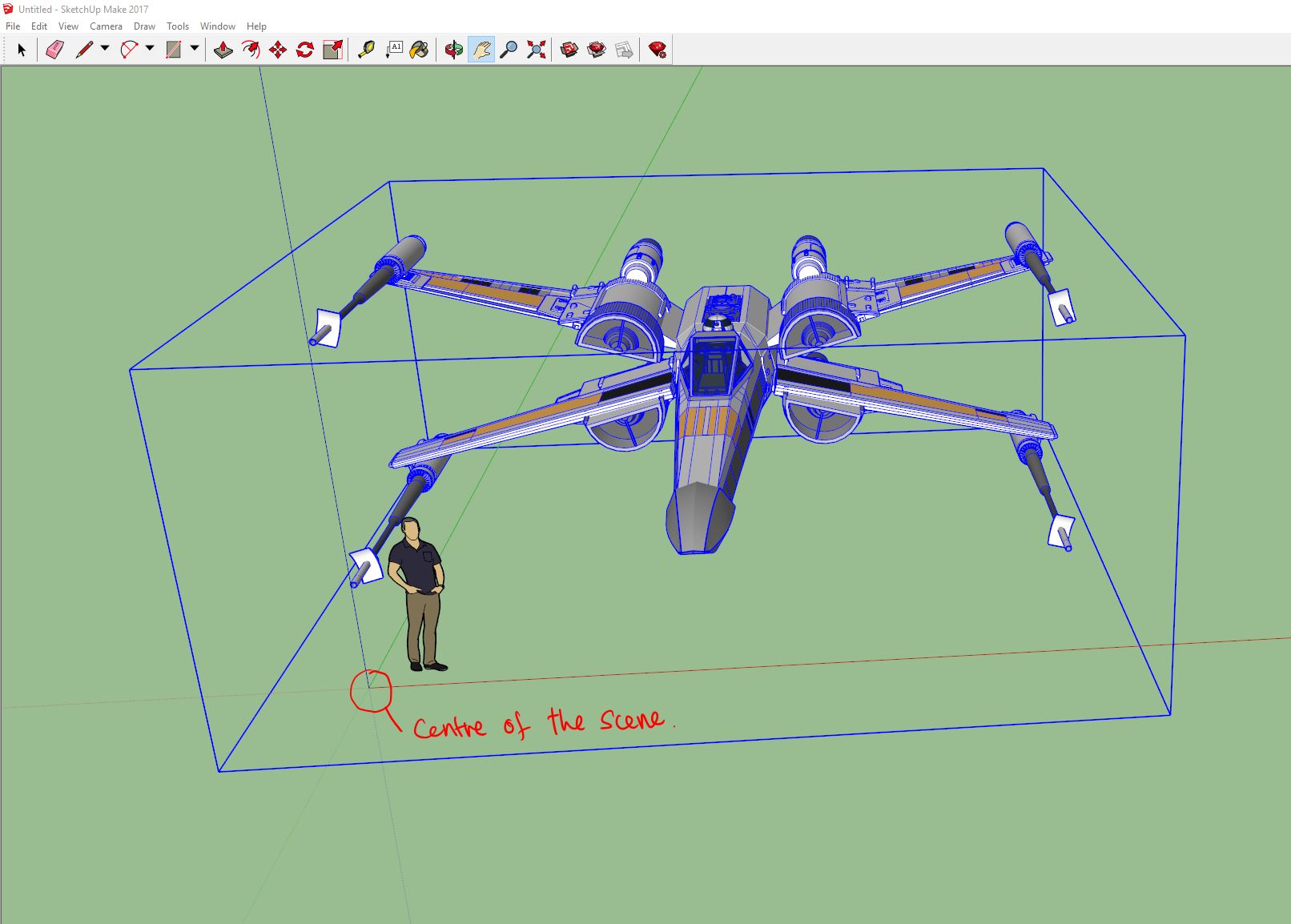
Once you have it, you want to place it in the centre of the sketchup scene (look for the lines and scale it to roughly the accurate size – often some models are either too large or too small) I find the easiest way to make sure you have it roughly the right size is to either eyeball it against the little guy that’s in the default scene or, better, to create a simple cube with the right width/length/height of the object (so if the final object is supposed to be 9′ 6″, I make a cube that height, then scale the object to that size.)

Next, I clean up the scene a little, delete any extra objects I don’t need (and if I have to, edit the model to remove stuff that’s extra/not required) and, importantly, move the centre of the object to match the centre of the scene – this is becomes the objects centre when rotating/etc in Clip Studio, so important to get right here!
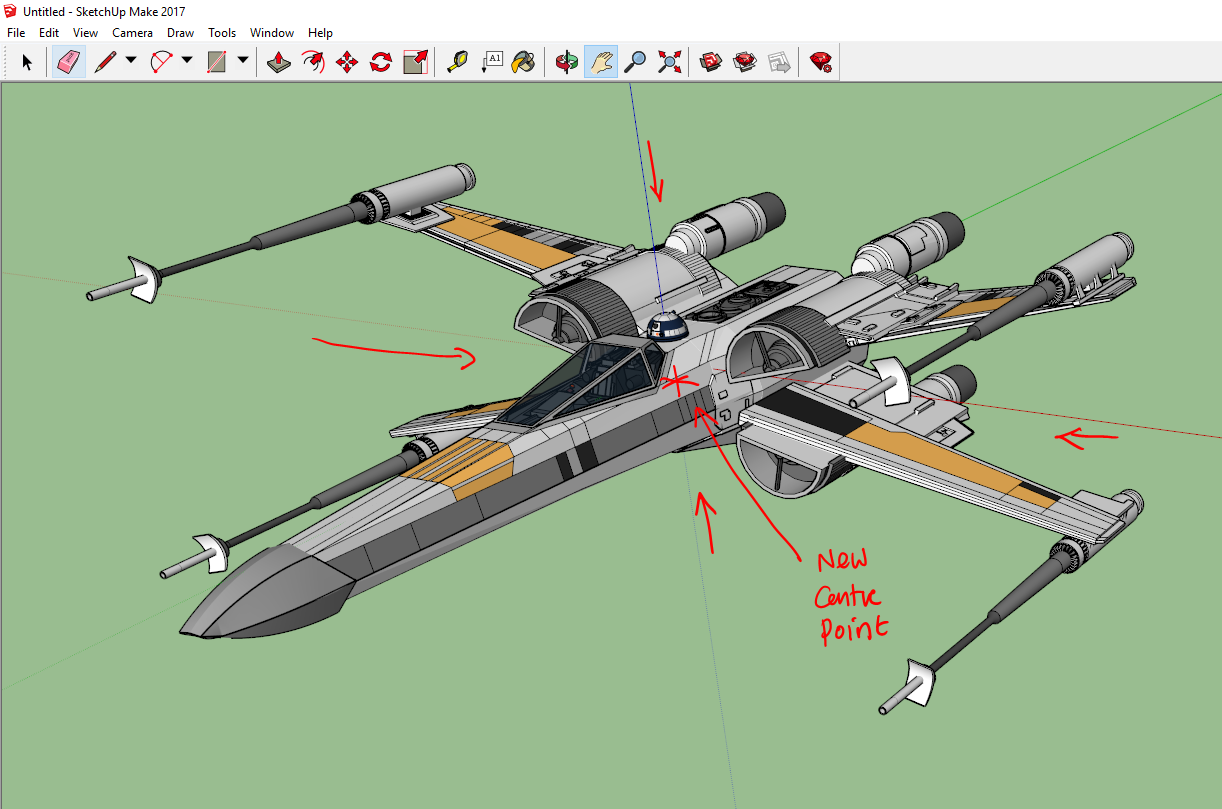
Now we have to “explode” the model. Sketchup models are made up of groups of ‘components’ as well as basic primitive shapes. The components are often duplicates of other groups/collections, what this means is that a simple export will frequently not export everything you need. Exploding the object will break the components up in to their simple constituent parts. The thing is you will have explode and explode and explode again, as often there’s a hierarchy to how the model is built. Sounds complex, but it’s pretty simple.

Step 1: Select the model. Hit explode!
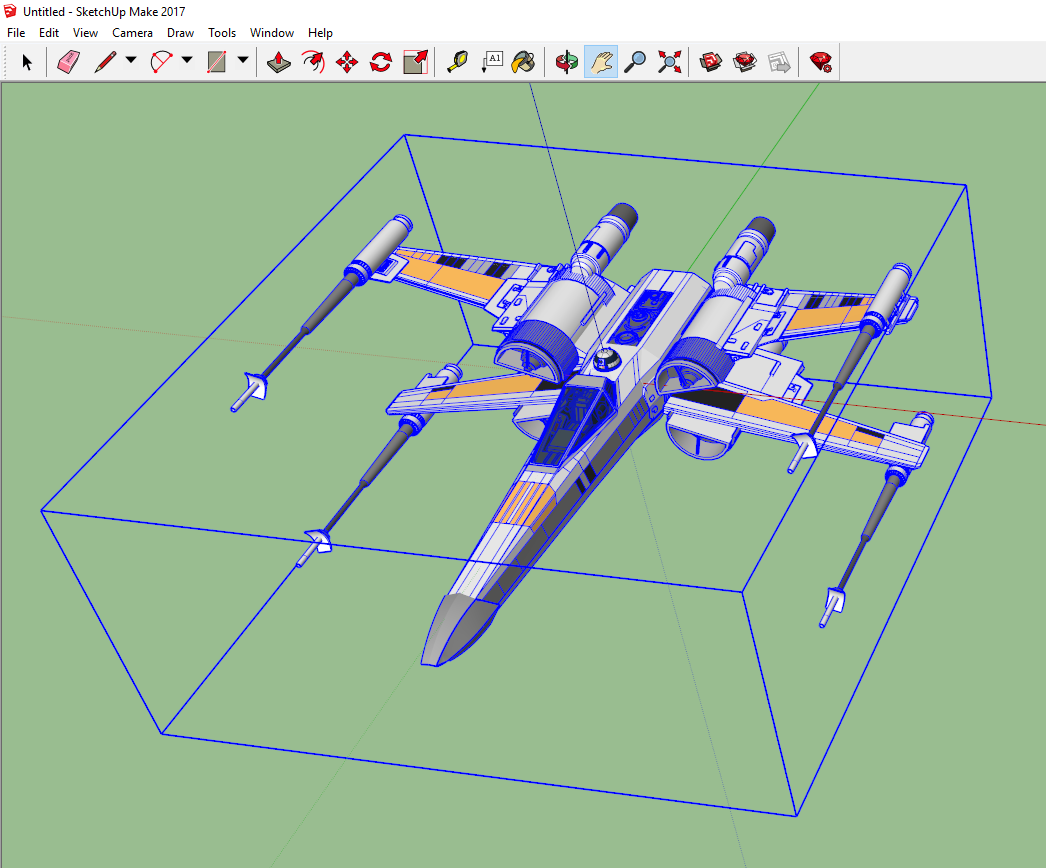
Here we’ve selected it, prior to the first explosion. Once selected, use EDIT->COMPONENTS (1 in model)->Explode

This will start the breaking down process.

Without selecting anything else, repeat

EDIT->COMPONENTS (1 in model)->Explode

(The number ‘1 in model’ will be different depending on your model)
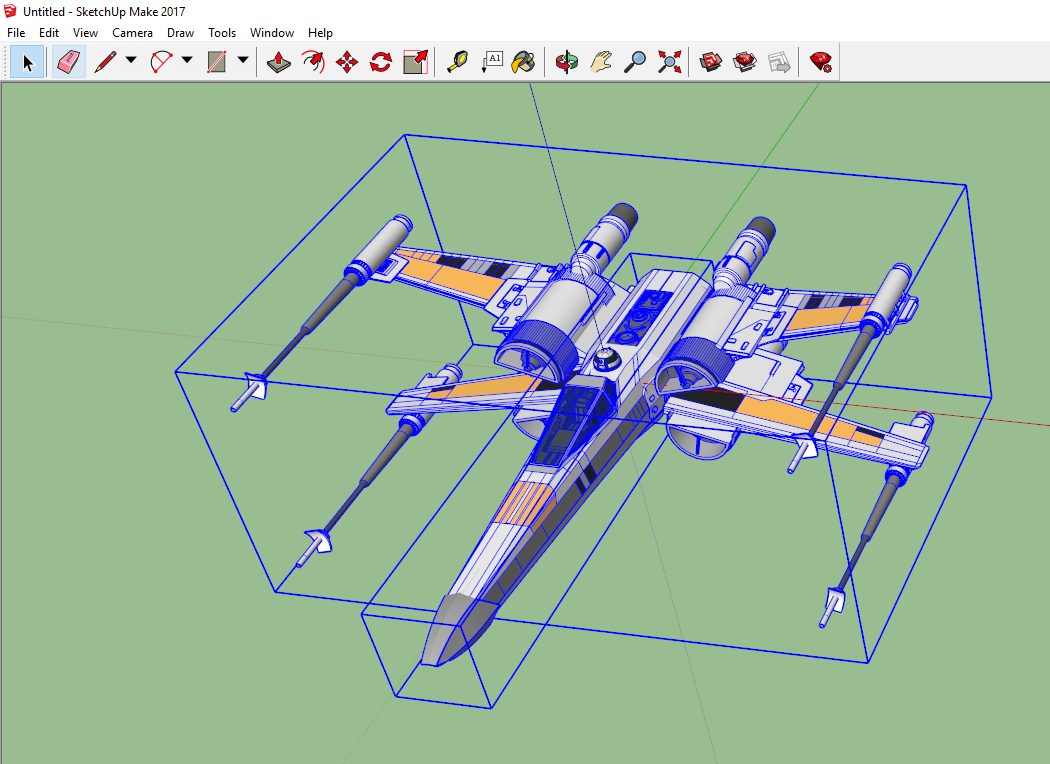
At this point, on this particular model you should start seeing more blue boxes around things. (BTW every model will break down in slightly different ways, and may require more or less steps)

Again don’t select anything – the edit menu might change a little, in this case we’ve broken one component down into two groups, so we select:

EDIT->2 Groups->Explode 

(The ‘2 groups’ will have replaced the ‘1 Component’ menu item – and again, this is particular for this model, the wording may be slightly different on your model, but the basic principle remains the same)
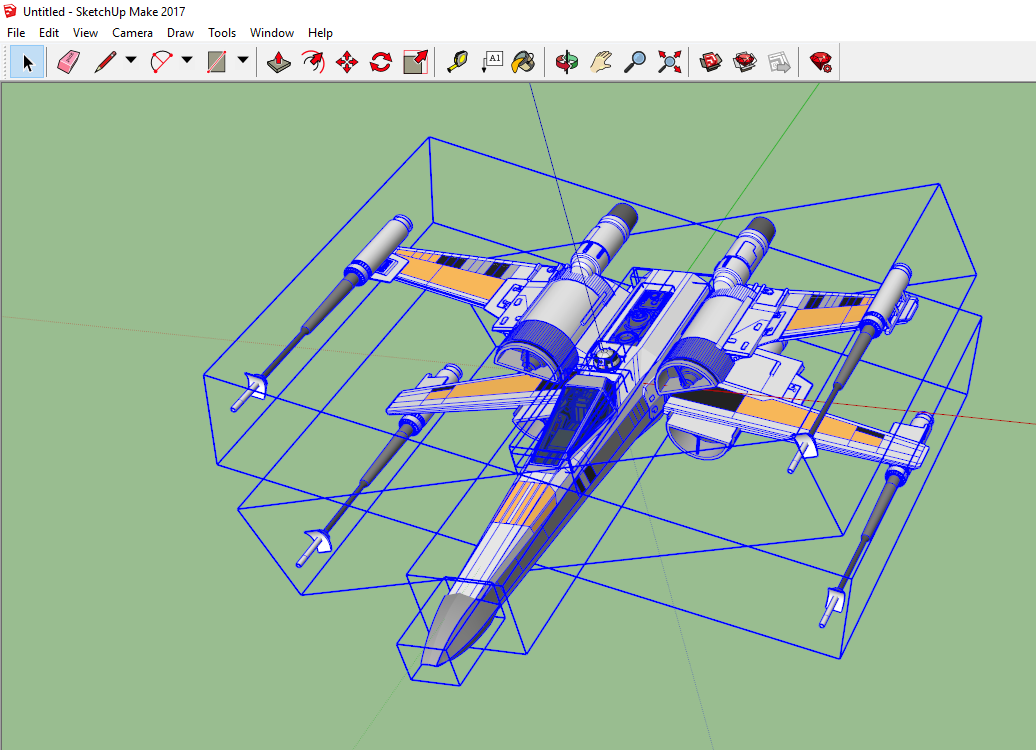
There should be more blue boxes (generally you’ll see blue boxes around groups of objects and blue outlines around components, and blue dots around basic shapes)

We keep repeating the explode process until the menu option greys out the word explode.

If you accidentally deselect anything, the easiest thing to do is to draw a selection box around the entire object, and continue on.
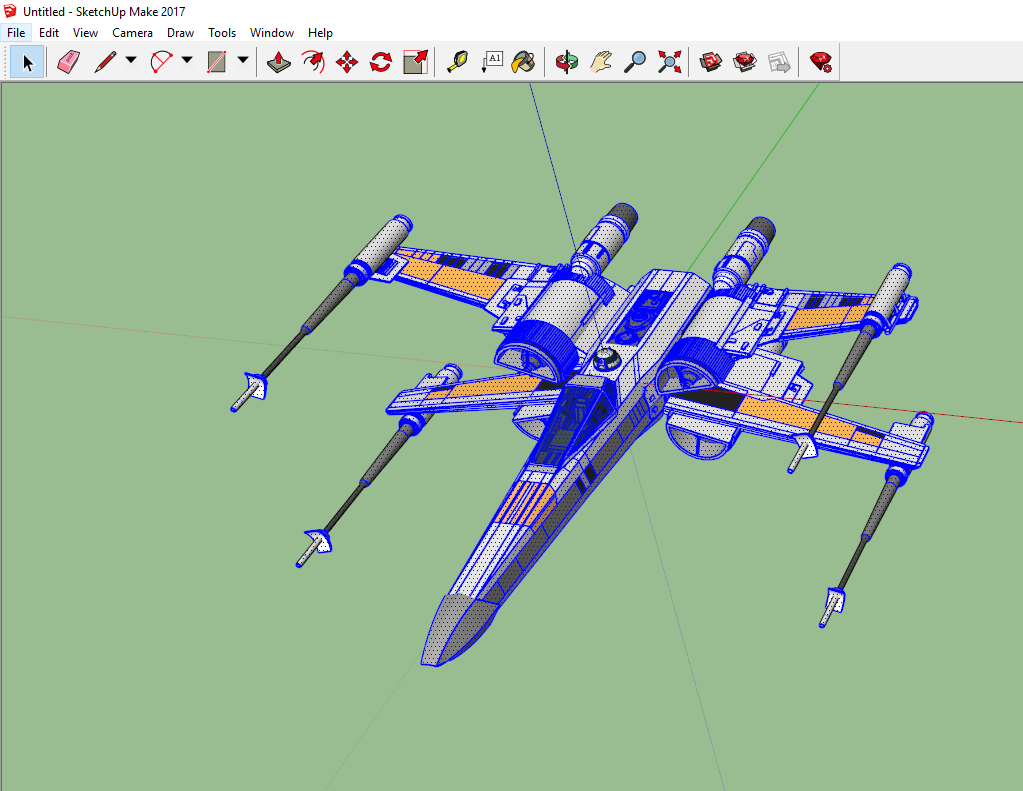
We keep going until we’re unable to explode. And we’re left with nothing but several thousand ‘entities’ (the basic shapes)

Now we can export.

Using file-Export->3d Model…

We export a Collada DAE file (we’ll call this x-wing)

Unfortauntely, this isn’t enough to get us into Clip Studio. Now we need BLENDER!

Start up Blender (assuming you have it, if not – go get it, it’s free)

Blender is a fiercly complex program, luckily we only need to do a few things in it.

Step 1, we’ll delete blender’s default object (a cube) just hit the delete key and click ‘OK’ when asked if you want to delete it.

Step 2, file->import->Collada (DAE) object. And find then select your object you’ve just exported (I apologise for Blender’s weird visual interface, but wasn’t my doing)
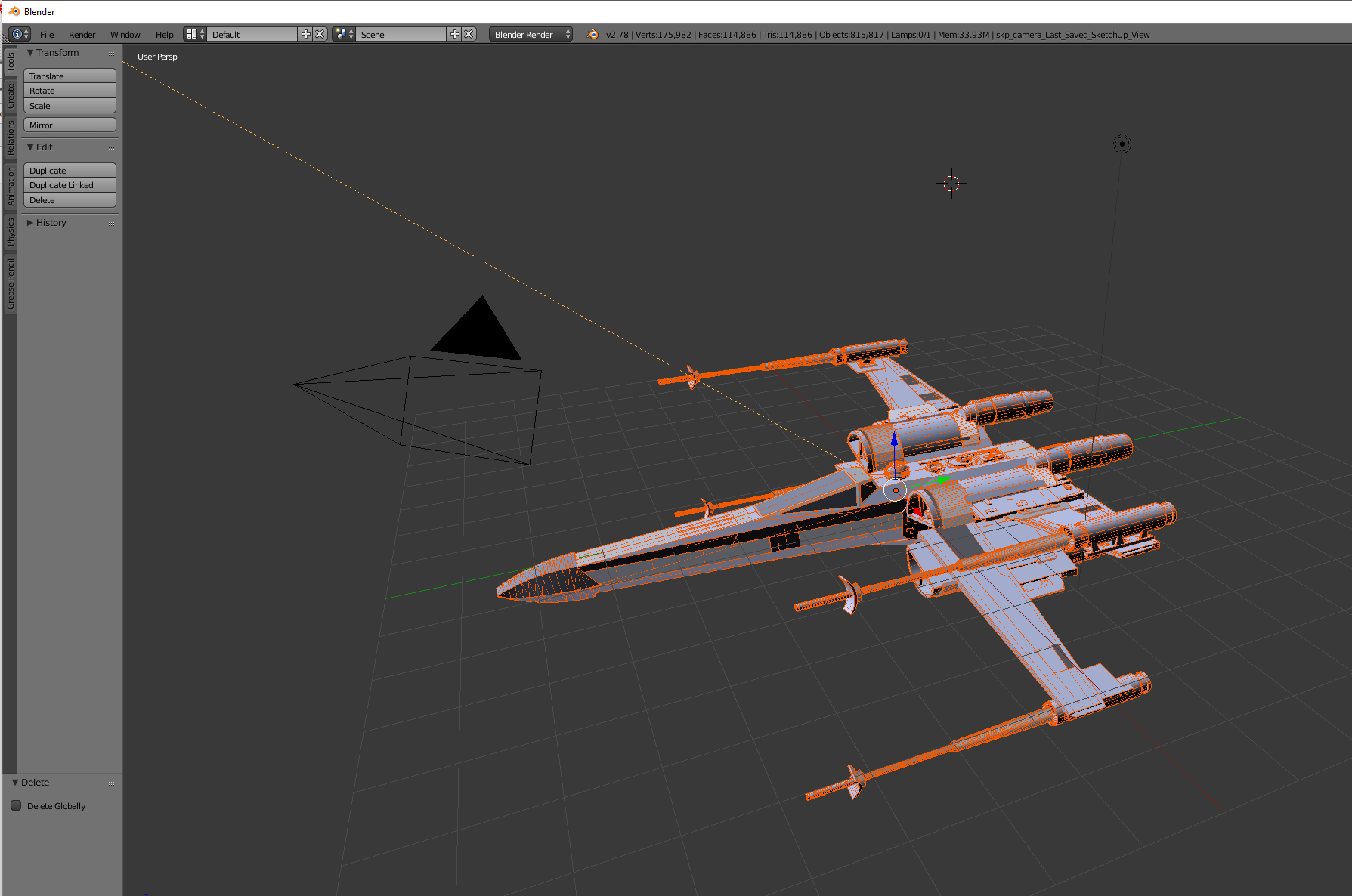
Step 3. File->Export->Wavefront (OBJ) and save it with a sensible name (here I’m going with xwing.obj)

And that’s it! Done with blender! You can now exit that program! (I’m trying to learn it a little, but boy-oh-boy it’s a nightmare!)

And now we can fire up Clip Studio Paint!

Now, getting an OBJ file into Clip Studio Paint is pretty simple matter of dragging and dropping – just find your 3d object and drag it on to a page. For reasons I haven’t figured out, sometimes that just doesn’t work, and you need to use file->import 3d data, but as long as it’s an obj file it should work fine.
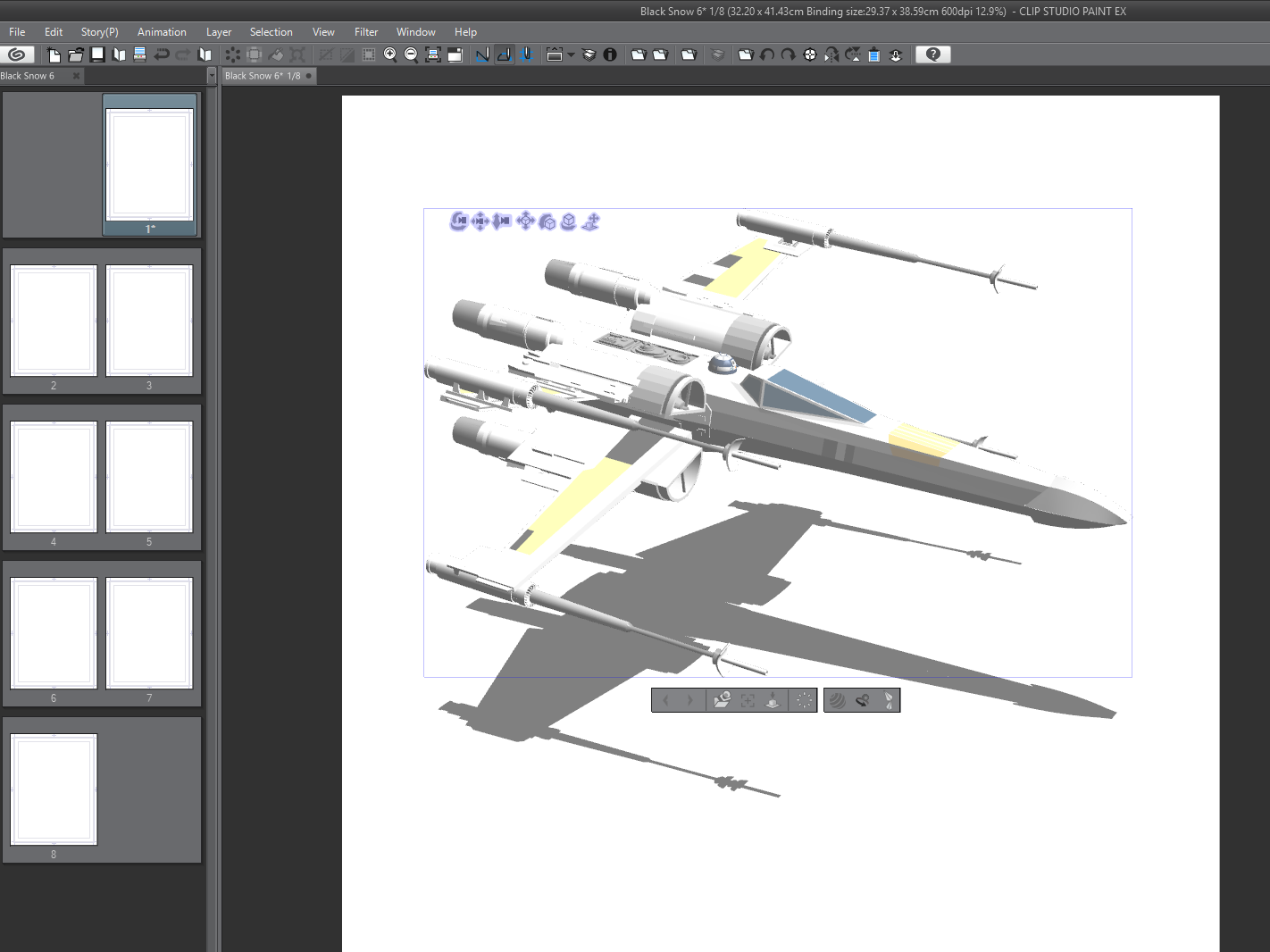
Model in Clip Studio Paint

Now we can either trace over this by hand, or convert it to an LT layer (basically leaving CSP to trace over the model)

I often convert to an LT layer and trace over that by hand, since i find it leaves the 3d model more ‘readable’ (for want of a better word)

(You find the ‘LT Conversion of layer…’ on the layer’s menu on the layer window – lots of options in this, so play around and see – though it can take a few moments to process when doing so)

Here’s the same model converted to an lt layer…
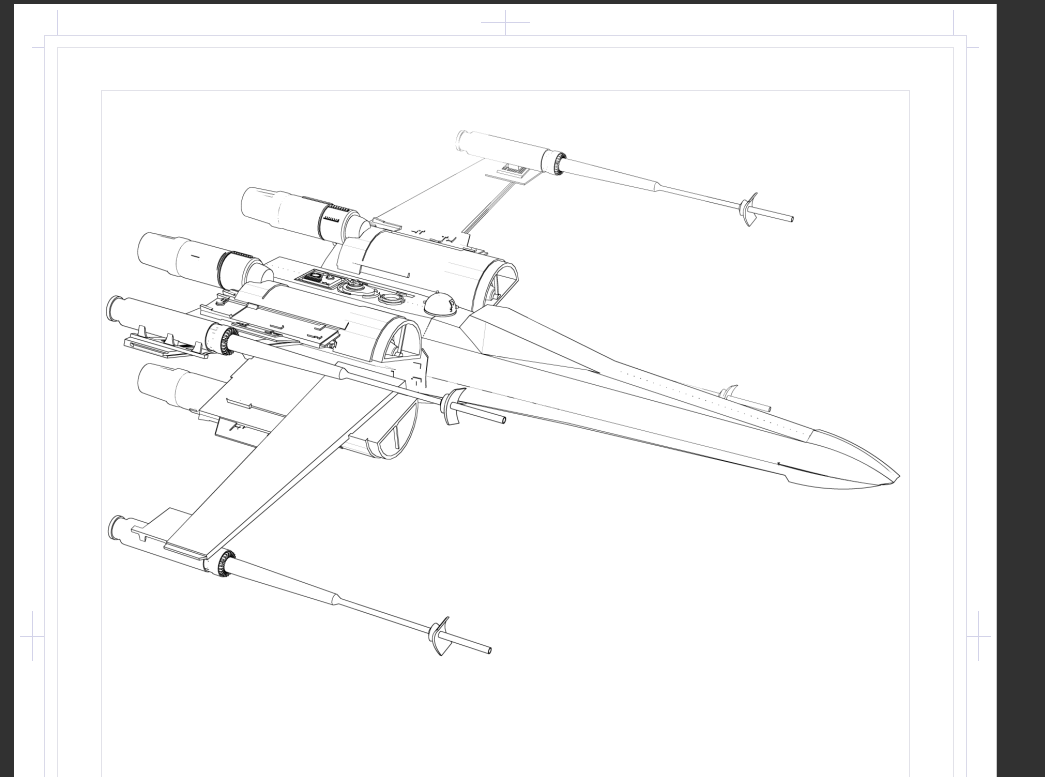
And that’s it. There’s LOTS more to play around with and consider (but they require more in depth knowledge of each package, there’s many great things you can do in blender in particular to help make the objects in CSP a little more readable for tracing over).

This knowledge was pretty hard won (seems simple now, but it really was experimental digging) would appreciate it if you can direct people over to the patreon if they want to see how to do it fully…
Once a day…

I’m kind of enjoying this one page per day thing. These are taking me between 10-50 minutes. (I hope, I haven’t timed them. I’ll be horrified if they’re taking more than an hour…).

I’ve sort of got an ending for this story, but I’m actually tempted to keep going. Not with this, with something else in November.

The benifit is the pressure is low – I just sit and think of something to do and draw that. It’s a little more pressure a few days in since now you actually have a story and an end point you’ve got to get to, and you can’t quite meander all over.

My plan is to do a simple 28 pages story, with cover and back cover, it means, potentially I have a 32 page comic. Which I’ll self publish and bring to cons etc (but in very limited runs).

I’m trying to think of the best way to give this away online though. My initial plan was just push it twitter (which is satisfying artistically if not financially rewarding) but you guys deserve it exclusively. 

New plan might be: one page a day on here (for all paying patreons) then at the weekend I unlock all the pages and send people over to read a week’s worth.

That’s worth considering.

(Course everything will fall apart the moment I have too much work on… which I already do. But this is like a little break from that)

At some point I should investigate comixology for selling digital comics.

My youngest son has been doing his own inktober comic too. It’s been fun sitting with him (and he’s enjoying mine) and I’ve been pushing that on twitter. I’ll maybe link his here to.

Anyway, any thoughts you have on the matter that’d be awesome. 

Oh, this Saturday is 24 hour comic book day – but you’re nuts if you think I’m committing to doing one of those.

Captain TomTom page 5…

Tom had some edits – always valuable feedback. Found the flashback stuff a little confusing (I mean they’re in space, so flashbacks to them in space WILL be confusing for a kid) so I’ve edited page 4 to make it more clear too.

Captain Tomtom page 3

How it’s working: I make up something, pencil it, add dialogue, then ink it, then have a think about tomorrow’s page. And go from there.

So I’m about one / three pages ahead, plus I have an idea of what happens in the end, so everything in between can go nutso. I mean I know exactly why Captain Tomtom got lost, I know what will happen when we get to the story, but I honestly have no idea what will happen between those two things. Beyond some notional ideas.

(Slightly annoyed with myself, that I didn’t get in this “Lost In Space” “I don’t think you can call it that” “Well, what about Captain Tomtom’s Star Trek home?” “Er… no” “Ugh. It’s like you want to have a war with me in space, a kind of STAR W..” “ALSO NO” but you do what you can…)

Also: patrons only from here on in with this strip, I’ll post little snippets of panels on twitter, but that’s it, if you’d like to spread the word, that’d be awesome!